From Static Mesh to Dynamic Design: Remodeling a Spinal Implant for 3D Printing
In the world of medical device manufacturing, precision and adaptability are paramount. While 3D printing offers incredible opportunities for creating complex and custom-fit parts like spinal implants, the process often begins with a significant challenge: the STL file. STL files, the standard format for 3D printing, are essentially "dumb" mesh models. They represent the surface geometry of an object but lack the underlying feature history, making them notoriously difficult to edit.
So, what happens when you need to modify a design, but all you have is a static STL file? We recently tackled this exact problem with a medical spinal implant, transforming a non-editable mesh into a fully parametric and manufacturable design.
The Challenge: The Limitations of an STL File
Our starting point was an STL file of a spinal implant, intended for 3D printing. While ready for the printer, it was a "dead-end" file. Any required modifications—whether changing the overall dimensions to fit a specific patient or altering the intricate lattice structure for better osseointegration—would have been nearly impossible, requiring a complete redesign from scratch. Our goal was to breathe new life into this static data.
The Solution: Intelligent Remodeling with Geomagic Design X
To overcome this, we turned to Geomagic Design X, a powerful reverse engineering software. Using the original STL as a reference, we meticulously remodeled the implant. The process involved converting the mesh data into intelligent, feature-based NURBS surfaces.
The result within Geomagic Design X was already a powerful, parametric model. However, to unlock true design flexibility, we wanted to bring it into a native CAD environment.
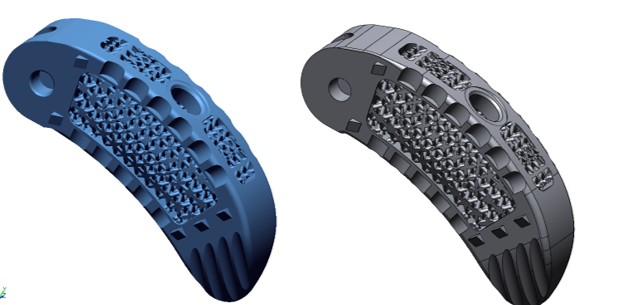
Seamless Integration: LiveTransfer to SolidWorks
This is where the workflow truly shines. Using the LiveTransfer feature, we seamlessly moved the complete model from Geomagic Design X directly into SolidWorks. This wasn't just a simple file import; LiveTransfer rebuilds the entire part, feature by feature, creating a native SolidWorks model with a complete, editable Feature Tree.

The model shown in the SolidWorks screenshot is the final result—a smart, history-based part that is indistinguishable from one designed in SolidWorks from the very beginning.
The Power of Parametric Design
With a fully parametric SolidWorks model, the possibilities are endless. We now have the power to:
Easily modify overall dimensions to create patient-specific implant sizes.
Adjust the complex lattice structure, changing its density, pattern, or beam thickness to optimize for weight and bone-in-growth.
Iterate on the design quickly and efficiently without starting over.
This project, which took approximately 6 hours of modeling time, successfully converted a rigid design into a flexible digital asset, perfectly suited for the demands of modern 3D printing and medical device innovation. This workflow proves that even when you start with a simple mesh, you can end with a truly intelligent design.
Comments
Post a Comment